Onboarding an Azure Subscription
This guide walks you through creating an Azure App Registration with Reader permissions and connecting your Azure subscription to Factor Fifty.
Prerequisites
- Access to the Microsoft Entra admin center or Azure Portal
- Global Administrator or Application Administrator role in your Azure AD tenant
- Owner or User Access Administrator role on the subscription(s) you want to onboard
- A Factor Fifty project to add the environment to
Step 1: Create an App Registration in Azure
Before adding your environment in Factor Fifty, you need to create an App Registration that allows Factor Fifty to read your Azure resources.
Register the Application
- Open the Microsoft Entra admin center
- Navigate to App registrations
- Click + New registration
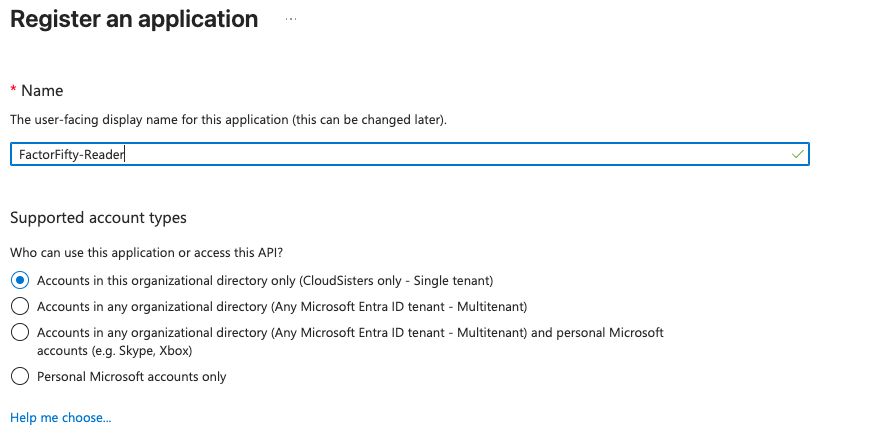
- Fill in the registration form:
| Field | Value |
|---|---|
| Name | FactorFifty-Reader |
| Supported account types | Accounts in this organizational directory only (Single tenant) |
| Redirect URI | Leave empty |
tip
Single tenant is the correct choice as long as all your subscriptions belong to the same Azure AD tenant. A single tenant can contain multiple subscriptions — the app can access all of them with the appropriate role assignments.
- Click Register
Copy the Application Details
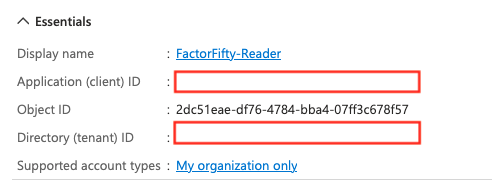
After registration, you'll land on the app's Overview page. Copy and save the following values — you'll need them when adding the environment in Factor Fifty:
- Application (client) ID
- Directory (tenant) ID
Step 2: Create a Client Secret
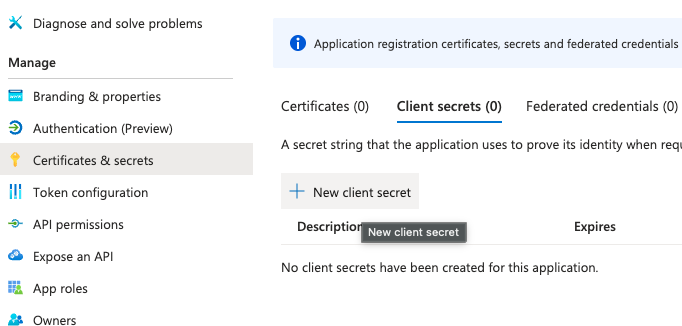
- In your app registration, navigate to Certificates & secrets
- Under Client secrets, click + New client secret
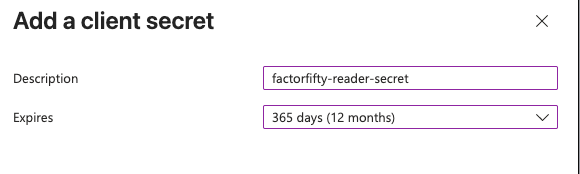
- Enter a description (e.g.,
factorfifty-reader-secret) and select an expiry period - Click Add
Important
Copy the Value of the secret immediately after creation. It will only be shown once — you won't be able to retrieve it later. Store it securely.

Step 3: Assign the Reader Role on Your Subscription
- In the Azure Portal, navigate to Subscriptions and select the subscription you want to onboard
- Click Access control (IAM) in the left menu
- Click + Add → Add role assignment
- In the Role tab, search for Reader and select it
- Click Next
- In the Members tab, click + Select members
- Search for your app registration name (
FactorFifty-Reader), select it, and click Select - Click Review + assign
tip
After creating the App Registration, wait a few seconds before searching for it in the member selection. Azure AD propagation can take a moment.
Multiple Subscriptions
If you need to onboard multiple subscriptions, you have two options:
| Approach | How |
|---|---|
| Per subscription | Repeat Step 3 for each subscription |
| Management group | Assign the Reader role at the Management Group level to cover all subscriptions under that group |
Additional Read-Only Roles
Depending on which Factor Fifty features you want to enable, you may need to assign additional roles alongside Reader:
| Role | Required for |
|---|---|
| Reader | Base resource visibility |
| Cost Management Reader | FinOps — cost data, budgets, and optimization recommendations |
| Security Reader | SecOps — Microsoft Defender for Cloud findings |
| Monitoring Reader | Monitoring — metrics, logs, and alerts |
Assign additional roles using the same process in Step 3 — just search for the desired role name instead of "Reader".
Step 4: Add the Environment in Factor Fifty
- Navigate to your project in Factor Fifty
- Click Add new environment
- Select Azure as the cloud provider
- Fill in the required fields:
| Field | Description |
|---|---|
| Subscription ID | Your Azure subscription ID (found on the Subscriptions page) |
| Tenant ID | The Directory (tenant) ID from your App Registration overview |
| Client ID | The Application (client) ID from your App Registration overview |
| Client Secret | The secret value you copied in Step 2 |
| Environment name | A friendly name to identify this environment (e.g., "Production", "Development") |
- Click Validate
tip
If validation fails, wait a few seconds and try again. Role assignments in Azure can take up to 30 seconds to propagate.
Alternative: CLI Setup
If you prefer using the Azure CLI, you can complete Steps 1–3 with the following commands:
# Login to Azure
az login

# Step 1: Create the App Registration
az ad app create --display-name "FactorFifty-Reader"
# Note the appId from the output

# Step 2: Create the Service Principal
az ad sp create --id <appId>

# Step 3: Create a Client Secret
az ad app credential reset \
  --id <appId> \
  --append \
  --display-name "factorfifty-reader-secret" \
  --years 1
# Save the appId, password, and tenant from the output

# Step 4: Assign the Reader role
az role assignment create \
  --assignee <appId> \
  --role "Reader" \
  --scope "/subscriptions/<subscription-id>"

# Optional: Assign additional read-only roles
az role assignment create \
  --assignee <appId> \
  --role "Cost Management Reader" \
  --scope "/subscriptions/<subscription-id>"
Important
Store the credentials securely. The client secret is only shown once during creation.
Verify the Setup
# Login as the service principal
az login --service-principal \
  -u <appId> \
  -p <client-secret> \
  --tenant <tenant-id>

# Verify you can list resources
az resource list --subscription <subscription-id> --output table

# Verify role assignments
az role assignment list \
  --assignee <appId> \
  --subscription <subscription-id> \
  --output table
Troubleshooting
Validation Failed
If validation fails in Factor Fifty, check the following:
- Verify the Subscription ID: Ensure the subscription ID is correct
- Check the Client ID and Tenant ID: Confirm they match the values on the App Registration overview page
- Verify the Client Secret: Ensure you copied the secret Value, not the Secret ID
- Wait for propagation: Role assignments can take up to 30 seconds to propagate. Wait a moment and try again
- Check the role assignment: Navigate to the subscription's Access control (IAM) → Role assignments and confirm the app is listed with the Reader role
Permission Errors
If you receive permission errors after onboarding:
- Verify the Reader role (and any additional roles) are assigned on the correct subscription
- Check that the client secret has not expired
- Ensure the App Registration has not been deleted or modified
- If using additional features like FinOps, verify the Cost Management Reader role is also assigned
App Registration Not Found in Member Search
If the App Registration doesn't appear when searching for members in Step 3:
- Ensure you completed both the App Registration and the Service Principal creation (the CLI creates these separately)
- Wait a few minutes for Azure AD to propagate the new identity
- Try searching by the Application (client) ID instead of the display name